




.svg?la=en&revision=cee9767f-8e72-4d76-a07a-14ba25688269&hash=ADF64722447408F8CA70B4436F59CB64)

Advanced Antenna Acquisition & Analysis
Model: SW-A4
Features
- Convenient, flexible, and intuitive interface
- Consistent experience for all acquisition types
- Full-featured, language-agnostic API with multi-platform support
- Multicore processing improves analysis and Near-Field to Far-Field transformation time
- Modern platform meets industry and government security standards
- Multithreading enables task parallelization
- Supports legacy NSI2000 and MI-3000 file formats
- Scalable Microsoft SQL Server database with nearly unlimited dataset size
A4 Software
Introducing Advanced Antenna Acquisition and Analysis (A4), the newest antenna measurement software from NSI-MI, expertly engineered for data collection, analysis, automation, and plotting. A4 builds upon the decades of experience and optimization built into NSI-MI’s legacy software platforms, NSI2000 and MI-3000, while adding modern features and capabilities that meet the challenges of today. A4 seamlessly blends the user-friendly interface of NSI2000 with the performance and versatility of MI-3000. Its intuitive design and powerful Application Programming Interface (API) deliver the adaptability needed to handle even the most challenging measurement tasks. A4 offers multicore, multithreaded support to greatly improve processing time while adding the ability to parallelize analysis and transformation tasks. Choose the perfect solution with NSI-MI's four software tiers, each packed with tailored features to match your specific requirements. Let NSI-MI help you choose the ideal package to fully unlock the potential of your antenna measurement range.
Benefits of A4 Software Platform

Improved User Experience
Collect, process, and export data, faster and easier.

Data Management
Securely store, analyze, and organize massive data with ease.

Next-Generation API
Streamline your workflow and boost productivity with less custom code.

Modern and Secure Platform
Future-proof solution for your data security and measurement requirements.
Improved User Experience
A4 has been purpose-built with the goal of optimizing user experience. The process of collecting and analyzing data for accurate antenna measurements can be confusing, but A4 simplifies the end-to-end process. The intuitive user interface takes the guess work out of measurement setup, data collection, advanced analysis, and visualization. Some notable features are highlighted below:
- Measurement templates allow operators to bypass most scan setup tasks
- Consistent user interface for all acquisition types
- Automatic speed, dwell time, and scan size calculators
- Plotting enhancement tools, including plot markers, spec lines, drag and drop overlays, rubber band zoom, and more
- Completely customizable user interface, with dockable menus, project tree, and plot windows
- Hotkeys to automate common software tasks
Data Management
As antennas become increasingly complex, so do the requirements imposed upon the software used to characterize them. A4 has been built to meet the data management challenges of today, with scalability to support the industry’s needs well into the future. A4 uses a Microsoft SQL Server database, which allows for nearly limitless data set sizes, ideal for complex active antenna characterization. Some additional data management capabilities are highlighted below:
- Customizable Project Tree keeps data organized for quick retrieval and convenient grouping
- Multicore and multithreaded processing supports task parallelization to greatly improve efficiency
- Detailed metadata provides complete traceability and context for each dataset
- Flexible import and export tools provide simple interfaces to other applications
- Process data from MI-3000 and NSI2000 software
Next-Generation API
A4 includes a robust Application Programming Interface (API) to automate all tasks available through the GUI, and more. This language agnostic API gives you the flexibility to control A4 remotely from virtually any programming language imaginable. This approach removes the limitations of a dedicated script engine, unlocking the potential to automate tasks in your language of choice. Additional features of the API include:
- Built around the open-source Google Remote Procedure Calls (gRPC) client-server framework
- API examples available in Python, MATLAB, and C# to help get you started
- Cross-platform support allows you to run applications from other operating systems
- Interactive documentation allows you to browse API methods and test them out on-the-fly
- Run custom A4 code from your AESA controller to maximize efficiency of calibration and test

Multi-platform and language agnostic API
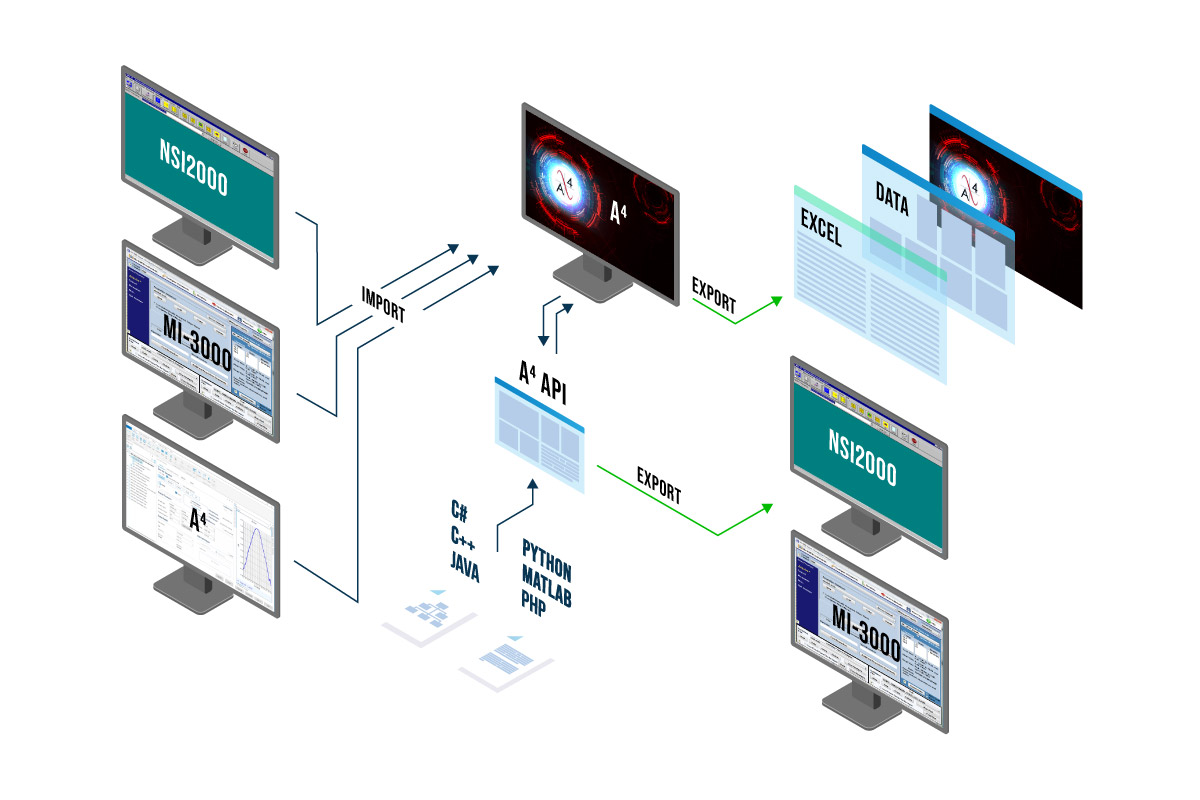
The A4 API unlocks the full potential of your measurement software, offering unparalleled flexibility for even the most complex scenarios. With its open-source gRPC client-server framework, A4 is fully language agnostic, allowing seamless integration of custom code directly into your existing programs. The client-server architecture enables cross-platform API calls, whether from a Linux-based array controller or a mobile device used as a handheld remote in the chamber. With the A4 API, the possibilities are endless!
Flexible data import and export tools
A4 provides versatile options for importing and exporting data, tailored to meet your specific needs. You can easily import data from other A4 sites and legacy platforms like MI-3000 and NSI2000, while batch import tools streamline the organization of large data collections. This makes transitioning existing ranges to A4 seamless, preserving all your historical data. The API further enhances the software's capabilities, allowing you to import data from virtually any source or format, including simulations or external facilities for seamless comparison to measured data. Powerful export features include multiple built-in formats, with even more customization available via the API

Direct database access for site-wide processing
A4's advanced database architecture empowers range operators, engineers and managers to seamlessly access multiple databases across an internal network. With centralized access to data from multiple test ranges, processing becomes more efficient. This streamlined approach maximizes operational efficiency while eliminating data redundancies, ensuring smooth, coordinated data management across your entire operation.

Virtual Control Panel (VCP)
The VCP provides a convenient single interface for sub-system level control. Within the motion tab, we’re able to command and configure the various mechanical axes in the range. Axes can be disabled to prevent accidental motion, re-arranged, or commanded to a desired position. The RF sub-system can be configured and exercised to optimize power levels, check dynamic range, perform a stability measurement, and more.
A4 Software Package Tiers
The table below describes the four available tiers of A4 software, with major capabilities and features outlined.
| Model Number | Description | Features |
|---|---|---|
| SW-A4-SE | A4 Standard Edition Software | Acquisition:
|
| SW-A4-PE | A4 Professional Edition Software | All Standard Edition Features, plus:
|
| SW-A4-EE | A4 Enterprise Edition Software | All Professional Edition Features, plus:
|
| SW-A4-UE | A4 Ultimate Edition Software | All Enterprise Edition Features, plus:
|
User Help Guide
A4’s User Help Guide is designed to help you navigate its features and functionalities, whether you're a first-time user or looking to expand your knowledge. Inside, you'll find step-by-step instructions and troubleshooting tips to enhance your experience